Enterprise BI & Power Platform Modernization
A modernization initiative focused on improving how enterprise Power BI, Power Apps, and Power Automate solutions are developed, versioned, deployed, owned, monitored, and supported in production.
Business Challenge
As enterprise BI and Power Platform solutions grow, development can become difficult to manage when reports, applications, flows, credentials, and deployments depend too heavily on individual developers or manual processes.
The objective of this modernization effort was to introduce more structured development standards, repeatable deployment practices, source control, governed production ownership, automated monitoring, and improved application lifecycle management across Power BI and Power Platform solutions.
Modernization Strategy
The modernization approach focused on moving from developer-centric ownership and manual deployment toward a governed and repeatable enterprise operating model.
- • Developer-owned reports and solutions
- • Limited Power BI source control
- • Manual deployment between environments
- • Personal credentials used in connections
- • Limited change history
- • Production dependency on individual users
- • PBIP-based source control with Git
- • Standardized deployment pipelines
- • Dev → Test → Production promotion process
- • Governed service-account ownership
- • Improved version history and traceability
- • Repeatable ALM and support practices
Target Operating Model
The target model connects development, source control, environment promotion, governance, and production support into a controlled lifecycle for enterprise BI and Power Platform solutions.
Development
Build analytics solutions
Source Control
Track and govern changes
Deployment
Promote validated releases

Governance
Centralize ownership
Production
Operate and support
Enterprise BI Lifecycle
Controlled Development
Developers work in structured environments with source control, validation practices, and clear change history.
Governed Deployment
Solutions move through Dev, Test, and Production using controlled promotion and release practices.
Sustainable Production
Production ownership, credentials, monitoring, and support are designed to reduce dependency on individual developers.
Power BI Version Control with PBIP & Git
One of the major improvements was introducing a source-control approach for Power BI development using Power BI Project files (PBIP) and Git.
PBIP allows report and semantic-model artifacts to be represented as project files that can participate in modern source-control workflows rather than relying only on standalone PBIX files.
Deployment Pipelines
Deployment pipelines were used to create a structured promotion process between development, testing, and production environments.
Build & Validate
Reports, semantic models, applications, and automation changes are developed and validated before promotion.
Controlled Testing
Changes are promoted into a controlled testing environment for validation before production deployment.
Governed Release
Approved solutions are promoted into production using a more consistent and repeatable deployment process.
Power Apps & Power Automate ALM
The same modernization principles were extended beyond Power BI to Power Apps and Power Automate solutions.
The goal was to improve application lifecycle management by making solution development, testing, deployment, ownership, and support more consistent across environments.
Automated BI Monitoring & Refresh Orchestration
Power Automate workflows were used to orchestrate recurring BI validation, conditional refresh execution, status evaluation, and automated notifications across analytics solutions.
Validation & Refresh Orchestration
A scheduled workflow performs automated validation checks, evaluates results, executes refresh actions when validation passes, and routes failures through notification paths for operational follow-up.
Scheduled Validation
Recurring checks before downstream refresh.
Conditional Logic
Validation controls the next processing step.
Dataset Refresh
Refresh runs after validation succeeds.
Operational Alerts
Teams and email surface failures.
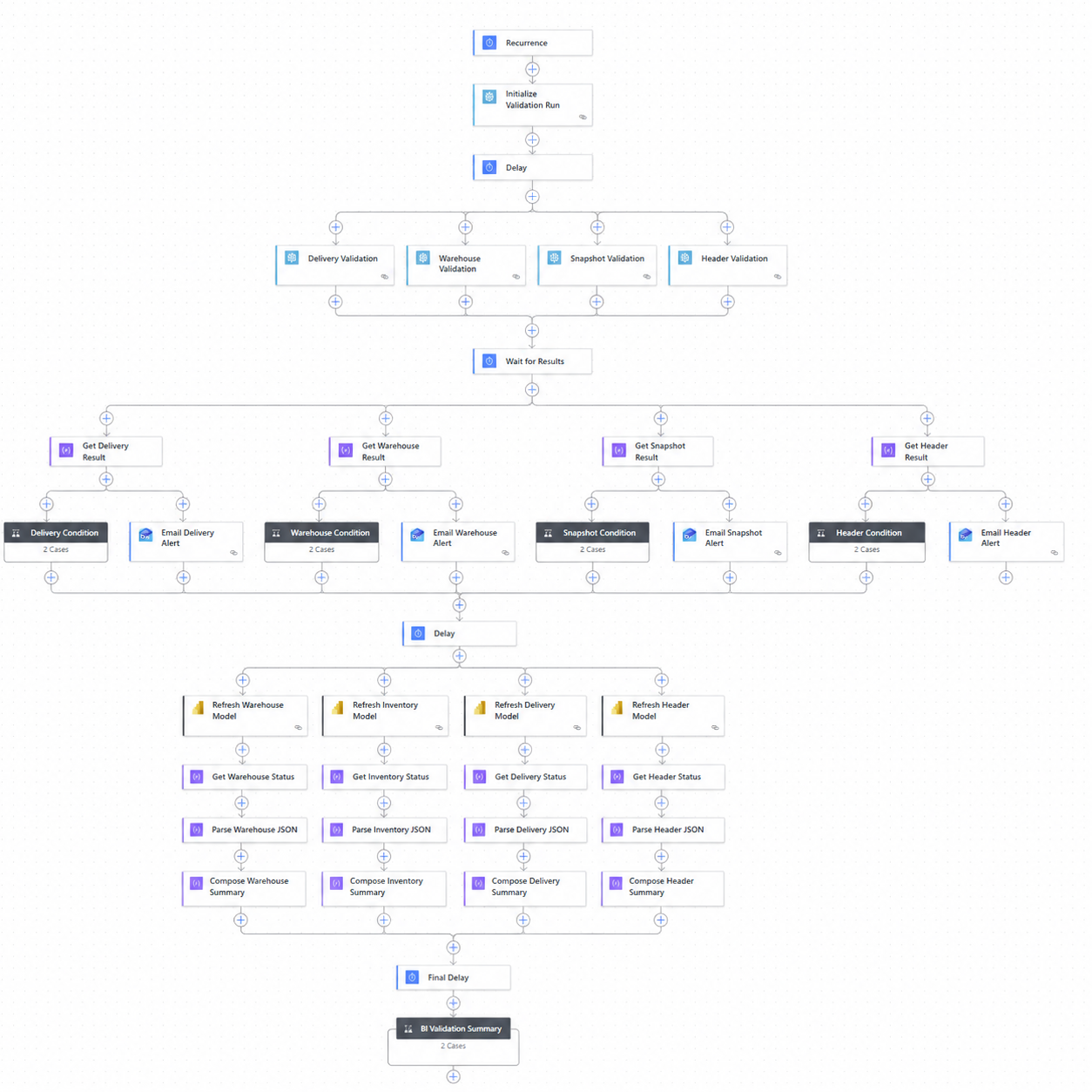
Validation, Status Parsing & Notification
Supporting automation handles result parsing and operational exception management. Failed validation or refresh conditions can trigger targeted Teams and email notifications, allowing support teams to identify issues without manually monitoring each dataset.
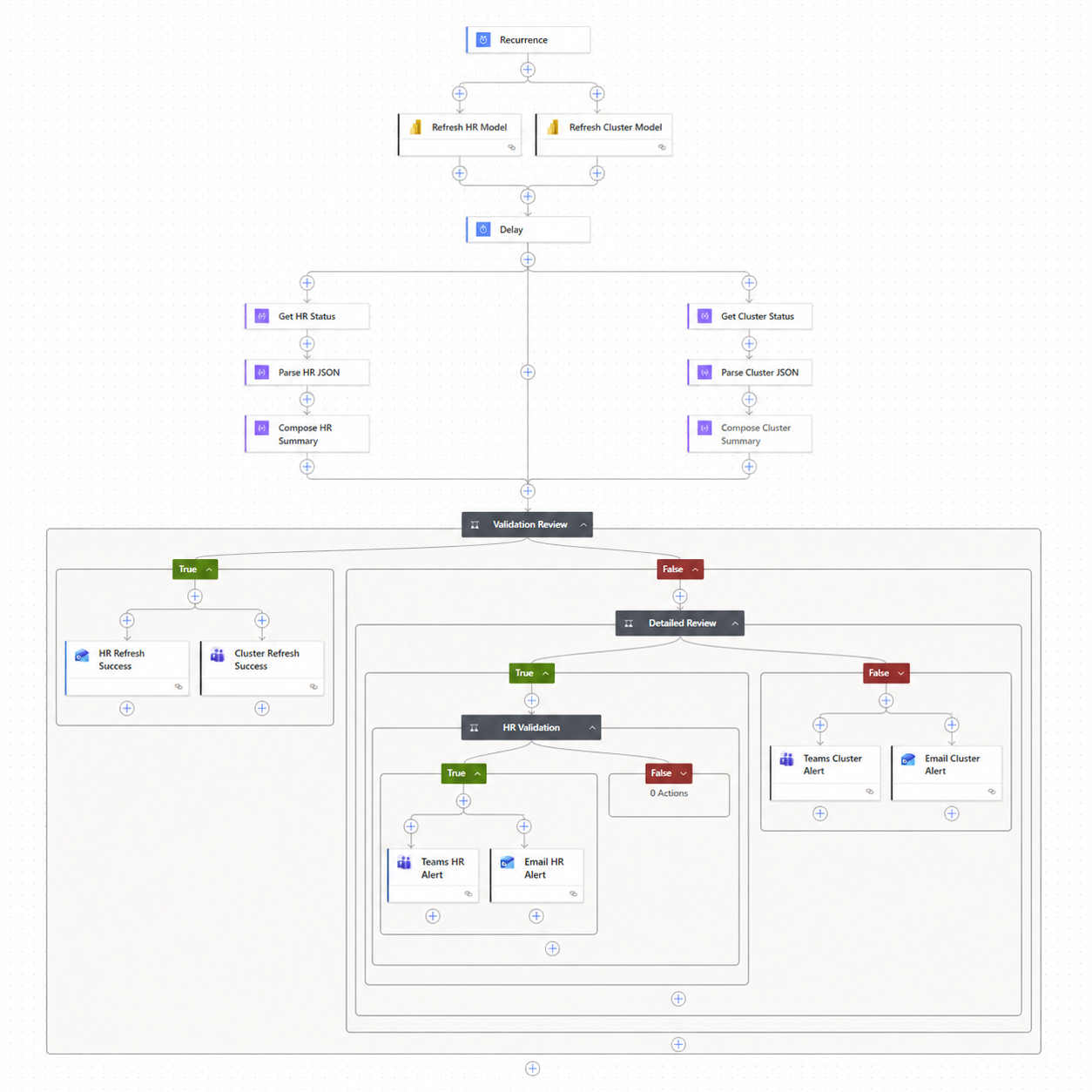
Flow labels and business-specific terminology have been sanitized for portfolio presentation. No credentials, internal identifiers, production configuration, or proprietary data are shown.
Automation Pattern
Service Accounts & Credential Governance
Production BI and Power Platform solutions should not depend on an individual employee's personal credentials whenever a governed service-account model is appropriate.
The modernization approach moved production ownership and credentials toward shared enterprise service accounts, improving continuity and reducing operational dependency on individual users.
- • Personal user credentials
- • Individual application ownership
- • Risk when employees change roles or leave
- • Difficult production support
- • Governed service accounts
- • Centralized production ownership
- • Improved credential continuity
- • Better support and maintainability
Ownership & Support Model
Platform modernization also requires clear responsibility for who develops, approves, deploys, owns, and supports production solutions.
Develop
Build and test changes using standardized development practices.
Review
Validate changes before promotion into higher environments.
Deploy
Promote approved solutions through controlled deployment pipelines.
Support
Maintain production solutions through governed ownership and credentials.
Development Best Practices
Business & Technical Impact
Technology Stack
Business Intelligence
Power BI
PBIP
Semantic Models
Power BI Service
Power Platform
Power Apps
Power Automate
Solutions
ALM
DevOps & Deployment
Git
Version Control
Deployment Pipelines
Environment Promotion
Governance
Service Accounts
Credential Governance
Ownership
Production Support
Enterprise BI requires more than building dashboards.
Sustainable analytics platforms require source control, environment management, deployment standards, automated monitoring, governed credentials, clear ownership, and repeatable application lifecycle practices. The modernization effort created a stronger operating model for Power BI and Power Platform solutions while reducing dependency on individual developers.
This case study summarizes enterprise BI and Power Platform modernization patterns based on professional experience. Workflow labels and examples shown in portfolio visuals have been sanitized for presentation. The case study does not expose confidential company environments, credentials, customer information, production configuration, or proprietary implementation details.